
|
 |

 Bombay
Motor Store (BMS) Bombay
Motor Store (BMS)
|
Browse
through the site for a One-stop-shop solution for all your
Automobile Spare-parts requirements. Search & send an
RFQ from an Extensive Range from ‘cotter pins’ to ‘crankshafts’.

At the same, you can source your Custom-Built Components
for Industrial, Engineering, Electrical & Automotive
Sectors from us as we are Contract-Manufacturers Specialized
in Design/Development & Production as per Clients'
Specifications.
|
 Mission Mission
|
We are
determined to enable our customers to timely achieve
their goals, by delivering value engineered products
& services generated through transparent, professional
management system. |
 About
Us & Our Evolution About
Us & Our Evolution
|
Established
in 1968 as a Automotive Spare-parts Trading Concern ,the
Company has gradually evolved into a Professional
Engineering company, with expertise in DIVERSIFIED fields
beyond Automotive & caters to Industrial, Electrical
Engineering OEM clients by Design/Development &
Production as per customized specifications. At the same the
company still serve the Global Automotive Industry by Export
Trading of Spare-parts for Indian & International
vehicles. |
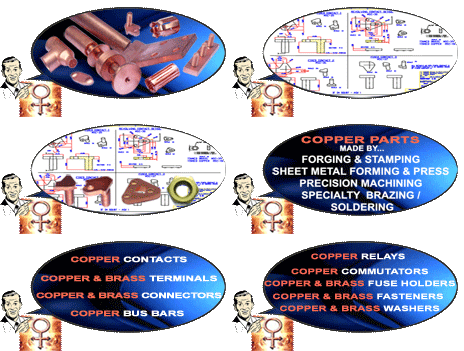
 Copper
Parts Manufacturing at BMS Copper
Parts Manufacturing at BMS
|
We are
Contract-Manufacturers of specialized in Copper Component
Producing Technology. One wing of our unit is solely devoted
to Copper.
This wing processes Custom-Built Copper Parts, Components &
Sub-Assemblies for OEM Electrical Industry with Specialized
Focus on Automotive, Marine, Power Transmission (HT/LT) &
Consumer Electrical Industries . Our Range of Custom built &
Mass Produced Copper Parts includes Contacts ,Bus Bars
,Terminals, Connectors, Relays, Commutators, Rotor Bar, Fuse
Holders, Fasteners / Washers, Clips, Springs & Wire
Forms ,Copper Pipes & Fittings, Custom Made Copper
Components & Assemblies Per Clients Specifications |
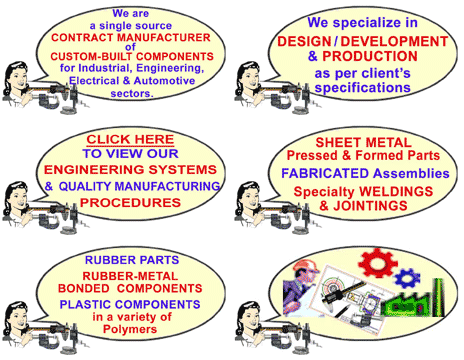
 Engineering
& Manufacturing at BMS Engineering
& Manufacturing at BMS
|
We are
Contract-Manufacturers of Custom-Built Components for
Industrial, Engineering, Electrical & Automotive sectors
with specialization in Design/Development & Production
as per Clients' Specifications.
Our wide spectrum of activities includes Forgings,
Castings, Sheet Metal Working, Fabrication, Specialty
Welding and Precision Machining of Ferrous and Non Ferrous
Components plus Springs, Bi-metal & Sintered Bearings &
Bushes , Rubber & Rubber to Metal Bonded Parts &
Plastics in various polymers.
Copper & Brass Components like Contacts, Buss Bars,
Connectors, Clips, Fasteners etc for Electrical & Power
Transmission, Applications is our Specialty.
|
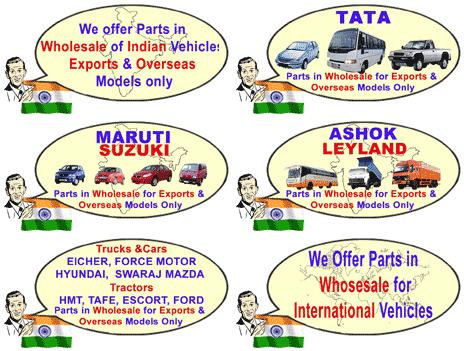
 Parts
For Indian Vehicles Parts
For Indian Vehicles
|
Browse
through the broadest portfolio of spares and parts for
vehicles of renowned brand, specially Tata, Mahindra,
Maruti, etc. You can find the right spare for your vehicle
by just selecting name of the model, or fill the query form
for special requirements. |
 Product
List Product
List
|
Browse
through the widest range of products imaginable in
Automotive Spare parts. To help you find the right product
and send an on-line inquiry we have the following options
for you : Automotive
Applications, Manufacturing Lines, Browse All and
Search, all of which are explained
below. |
|
 AUTOMOTIVE
APPLICATION AUTOMOTIVE
APPLICATION
|
|
This
displays all the Automotive Application groups like Engine Part,
Suspension parts, Gear Box items etc. Clicking on any of the
Automotive Application will take you to STEP
2. the page containing specific group of items. |
|
STEP
2: Online Browsing and Selection From our Automotive Items
Database: |
|
Here you get
all items of a specific Automotive Application displayed.
Clicking on the item name take you to its other dimension viz:
MANUFACTURING LINE
To Choose item(s) of your interest, Click on
 button , which takes you to the item query form, where you
specify the details of your chosen item. After which you Add
your query to the basket i.e STEP
3 .
button , which takes you to the item query form, where you
specify the details of your chosen item. After which you Add
your query to the basket i.e STEP
3 . |
|
STEP
3: View / Edit/ Submit All Selection |
|
Once you
have selected all the items of your interest, you may
collectively view/ edit all the them and proceed to send us the
product request. All the screens are self explanatory |
 MANUFACTURING
LINE MANUFACTURING
LINE |
|
This
displays the list of items as per its primary industry of
manufacturing/processing or the raw material ingredient being
used. For e.g. Forged items, Castings, Sheet Metal Items, Rubber
and Elastomers etc. Clicking on any of the Manufacturing Line
will take you to the specific group of items i.e. STEP
2 |
|
STEP
2: On-line Browsing and Selection From our Items Database: |
|
Here you get
all items of a specific MANUFACTURING LINE displayed.
Alert Note: Clicking on the item name take you to its other
dimension viz: AUTOMOTIVE APPLICATIONS. To Choose item(s) of
your interest/Click on add query button, which takes you
to the item query form, where you specify the details of
your chosen item. After which you Add your query to the basket
i.e STEP 3:
|
|
STEP
3: View/Edit/Submit All Items Selected from our Database: |
|
Once you
have selected all the items of your interest, you may
collectively view/ edit all of them and proceed to send us the
product request. All the screens are self explanatory. |
 ADDITIONAL
STEP FOR DIRECT ENQUIRY ADDITIONAL
STEP FOR DIRECT ENQUIRY
|
On every
Page of Manufacturing Line you will notice a banner displayed
right is front. clicking on this will be take you to Enquiry
form wherein we have provided free space for you to write
on-line about your required Customized Items with facility to
attach your Drawings/specification files to send us your
detailed Enquiry (without browsing/selecting from the our
product listings). |
 BROWSE ALL
|
All
Items- This
section lists all the products in alphabetical order. Clicking
on any of the products will take you to the specific Automotive
Application group. |
 Search
Products & Sevices Search
Products & Sevices
|
You can
Search for Our Products & Services & send us your
on-line Enquiry & Orders by any of the below enlisted
Channels A,B,C,D.
 Search
Product by Name or Few Characters of your desired Product
Search
Product by Name or Few Characters of your desired Product
|
Just
type in the initial letters/name of the specific product
you are looking for, and click on the search button.
This will give you an output of all items matching your
request. Clicking on any of the items in the output will
take you to the specific Automotive Application group. |
-
On-Line
Selection Of Indian Vehicles Parts Displayed In The
Website
|
Browse
through the broadest portfolio of spares and parts for
vehicles of renowned Indian brands, specially Tata,
Mahindra, Maruti, etc.. |
-
On-Line
Selection Of Products From Our Product List
|
Browse
through the widest range of products imaginable in
Automotive Spare parts & Manufacturing Lines.
|
-
Direct
inquiry (User defined Customised Items)
|
Free
space for you to write on-line about your required
Customized Items with facility to attach your
Drawings/specification files to send us your detailed
Enquiry (without browsing/selecting from the our product
listings).
This option is most suitable when you are a technocrat
from Industrial, Electrical ,Automotive or any other
Engineering Sectors wanting to source you customized
requirements by Design/Development & Production as
per your customized Specifications. |
 Search
Copper & Brass Components
Search
Copper & Brass Components
|
In
case you are a Product Designer /
Sourcing Manager wanting to source Copper or
Brass Parts requirements by Design/Development &
Production as per your customized Specifications.
Please click on
 and then click on Enquiry
Form to write on-line about your required
Customized Copper Items with facility to attach your
Drawings/specification files to send us your detailed
Enquiry
and then click on Enquiry
Form to write on-line about your required
Customized Copper Items with facility to attach your
Drawings/specification files to send us your detailed
Enquiry |
|
 Enquiry
Form Enquiry
Form
|
Free space
for you to write on-line about your required Customized Items
with facility to attach your Drawings/specification files to
send us your detailed Enquiry (without browsing/selecting from
the our product listings).
This option is most suitable when you are a technocrat from
Industrial, Electrical ,Automotive or any other Engineering
Sectors wanting to source you customized requirements by
Design/Development & Production as per your customized
Specifications. |
 FAQs FAQs
|
Read through
our list of Questions and Answers to clear your doubts. The FAQ’s
are categorised as follows. |
|
|
|
|
|
 © Bombay Motor Store. All Rights Reserved (Terms
of Use)
© Bombay Motor Store. All Rights Reserved (Terms
of Use)






 "AUTOMOTIVE
APPLICATIONS" and
"AUTOMOTIVE
APPLICATIONS" and "MANUFACTURING
LINES"?
"MANUFACTURING
LINES"?