|
 |
A) FAQs
Related To Browsing
|
Back
1.
How can I reach a product that I am looking for?
Answer to Q: 1
A single product that you are looking for is made available in any
of the following 2 dimensions.
|
For
a detailed explanation click here (link to: Q. no:
6,7,8,9,10) |
Alternatively, you can locate an item
by using the following general options.
|
For a
detailed explanation click here (link to: Q no: 11,12)
|
 Back
2.
What is an "Automotive
Application"? Back
2.
What is an "Automotive
Application"?
3. What is “listing by Automotive
Application”?
Answer to Q: 2, 3
An Automotive
Application means the functional Automotive
Application of a product to a particular section of the automobile
vehicle. For e.g.: Engine parts, gear box parts, suspension items
etc.
Listing by
Automotive Application displays together all the
Automotive Application groups like
engine part, suspension parts, gear box items etc.
Clicking on any of the Automotive
Application will take you to the page containing
all components of that specific Automotive
Application group like all engine parts enlisted together.
Thus all the components of the engine like pistons, rings, pins,
crankshafts, connecting rods etc are listed on a common page of
engine parts.
Few more examples!
A crankshaft can be located in the Automotive Application page:
engine parts.
A gear box, main shafts, speed gears can be located in the
Automotive Application page: gear box parts.
A hub bolt or a wheel stud can be found in the page axles, hubs &
drums
 Back
4.
What is a "Manufacturing
Line"? Back
4.
What is a "Manufacturing
Line"?
5. What is ‘listing by Manufacturing
Line’?
Answer to Q: 4, 5
Manufacturing
Line means grouping of items that have any one of the
following characteristics in common:
|
A)
Common primary industry of manufacturing/ processing |
|
or |
|
B)
Common raw material ingredient |
|
or |
|
C)
Items with common functionality |
Listing
by Manufacturing Line displays together all the
Manufacturing Line groups like forged items, castings, sheet metal
items, rubber & elastomers etc.
Clicking on any of a Manufacturing
Line will take you to the page containing all the items
of that specific Manufacturing
Line like all the forged components enlisted together.
Thus all the items of the Manufacturing Line ‘forged components’
such as crankshafts, yokes, cross holders, flanges, hubs, etc are
listed together on a common page.
Few more examples!
A crankshaft can be located in the Manufacturing
Line page forged components,
A gear box main shafts, speed gears etc can be located in the
Manufacturing
Line page: automotive gears,
A hub bolt or a wheel stud can be found in the Manufacturing Line
page: ‘fasteners :typical automotive application’.
 Back
6.
Why these "Automotive Applications" and "Manufacturing
Line" dimensions? Back
6.
Why these "Automotive Applications" and "Manufacturing
Line" dimensions?
7. How do you define the inter-relationship between
Automotive Application and Manufacturing Line?
8. Why are you providing the link between Automotive
Application and Manufacturing Line?
9. I click on a product I am interested in and i reach
an entirely different category, why?
10. Why clicking on a product name takes me to another listing?
Answer to Q: 6, 7, 8, 9, 10
Our experience says that an automobile component can be viewed
either by its Automotive Application to a vehicle section or by its
primary industry of manufacturing / processing or the raw material
ingredient being used which we describe as a Manufacturing Line.
(Refer to FAQ 2 & 4 ‘What is Automotive
Application / Manufacturing
Line?’).
This we feel will ensure flexibility to view and select the allied
items, if necessary, in any of the dimensions, along with the item
of your interest.
Take for example:
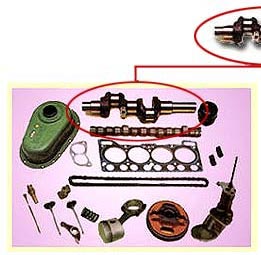
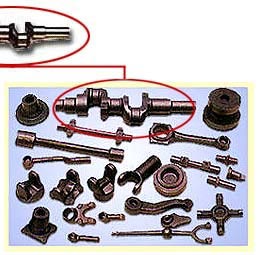
CRANKSHAFT
|
|
|
| Automotive
Application Page |
|
Manufacturing
Line Page |
| Engine
Parts |
|
Forged
Components. |
ENGINE PISTONS
W/PINS & RINGS
ENGINE PISTONS RINGS WITH HELPER RINGS
PISTON PINS (GUDGEON PINS)
GUIDES FOR ENGINE VALVES (INLET & EXHAUST)
ENGINE VALVES (INLET & EXHAUST)
CAM & CRANK SHAFTS
PULLEY/GEAR FOR TIMING
CONNECTING RODS
MAIN-CONNECTING RODS
MAIN-CONNECTION BEARINGS? THRUST WASHERS
ENGINE BUSHES (CAMBUSH< CON ROD BUSH, V.R. BUSH ETC) |
|
ENGINE
CONNECTING RODS
ENGINE CAM & CRANK SHAFTS
CLUTCH RELEASE FORKS, ARMS, LEVERS
GEAR CHANGER FORKS-LEVERS
GEAR BOX FLANGS, SHIFT LEVERS
PROPELLER SHAFT JOINT YOKES
UNIVERSAL JOINT CROSS HOLDERS
WHEEL HUBS, DRUMS, BRAKE DISC
MILLING ARMS FOR STEERING, SUSPENSION
KNUCKLE ARMS STEERING, SUSPENSION |
Back
As you can see in the example above a
crankshaft is displayed under the
Automotive Application: engine parts
as it is one of the prime components of an engine. Simultaneously
the primary industry / process of its manufacture for the
crankshaft is forging industry hence
it is displayed under the Manufacturing Line
forged components as well.
Now let us explain the above example from your angle. Suppose you
have clicked on theManufacturing Line forged
components and you find that you want to send us an enquiry
on crankshafts. At this juncture, our
past experience suggests that you may also require other fast moving
items of engine parts along with the
crankshaft. So we have facilitated our
website such that clicking on the crankshaft
(while in Manufacturing Line) will
take you to the Automotive Application
listing engine parts and there you can also order allied
engine parts like camshafts, gasket kits, main & connecting rods
etc.
Now let us see the reverse situation. Suppose you have clicked on
the Automotive Application engine parts
and you find that you want to send us an enquiry on
crankshafts, here it may so happen
that you may also like to order other forged
components along with the crankshafts.
So we have facilitated our website such that you click on the
crankshaft (while in Automotive Application)
will take you to the Manufacturing Line listing forged component
where you can also order other forging items such as connecting
rods, yokes, cross holders, flanges, hubs etc along with the
crankshafts.
Like wise all our products are having two dimensions like an engine
mount can be from under the Automotive
Application engine parts and also in the Manufacturing Line:
rubber parts. Clicking on the name ‘engine mounts’ in
Automotive Application listing takes you to the
Manufacturing Line: rubber parts,
which is the other dimension of the engine mounts.
Back
11.
What is BROWSE ALL?
Answer to Q: 11
Browse
All is display of all the Automotive items we offer in
an alphabetical order. Clicking on any product takes you to the
products group listed by Automotive
Application. (Also refer to Q:13. ‘Why does results of browsing
and search take us to Automotive Application listing?’)
Note: The Browse
All function is related only to our product database
where we have displayed only the prominent automotive components
listed in alphabetical order. Thereby, if you are a technocrat from
any other industry, you may not find the product of your interest in
the Browse All
facility. We therefore recommend you to send us detailed requirement
by clicking on the “Enquiry”
button on the side panel whereby you will be offered Free space for
you to write on-line about your required Customized Items with
facility to attach your Drawings/specification files to send us your
detailed Enquiry (without browsing/selecting from the our product
listings).
Back
12.
What is SEARCH Products & Services?
Answer to Q: 12
Clicking on the Search Button at the
main menu bar takes you to the Search page where you will find
various Search options . Here you should opt for Search A &
Simply enter your product name and it will query our entire database
to list out items that match the criteria with any part of the word
in our product database. Clicking on any product takes you to the
products group listed by Automotive Application.
(Also refer to: Q:13. ‘Why does results
of browsing and search take us to Automotive Application listing?’)
Note: the Search A
function is related only to our database where we have displayed
only the products related prominent automotive components & that
too in generic names.
Therefore, if you are a technocrat from any other industry &
are unable to find the product of your interest then you should opt
for the Search C
facility that will take you to a list of our various Manufacturing
Lines & click on any Manufacturing Lines you will get a display
of our various items from that particular manufacturing activity.
From this page you either can send a direct enquiry by clicking on
the Flashing Instructions or you can browse thru our product list
that is displayed below & select an items to send your enquiry
thru the collection in basket.
Back
13.
Why does results of browsing and search take us to Automotive
Application listing?
Answer to Q: 13
When you click at any of the items listed under the results of
Browse All
or Search,
you are taken to the Automotive
Application listing. This is so because we believe that
most people related to the automotive sector identify products with
their Automotive
Application. Therefore, it is appropriate that you as a
visitor view the items with the Automotive
Application listing. Since many items under one
application are demanded parallelly, we have tried to make the issue
simpler by putting all the items under the same
Automotive
Application with the item chosen, thereby enabling you
to pick and chose whatever you want from the same listing. However,
we always have the option open for you that by clicking on the item
name in the Automotive
Application listing takes you to the Manufacturing Line
of that item. To conclude, from the Search
or Browse All
listing of an item you can reach its Manufacturing Line only via its
Automotive
Application.
Back
14.
While browsing through the product list, i am not able to find the
product of my choice in your product list, what do i do?
15. I’m in a
hurry & don’t want to go through your product list, still i
want to send a product request, can i do so?
Answer to Q: 14, 15
When your are browsing through our product listing, at the bottom
of every detailed product listing page there is an option:
Clicking on the same will take you to the next screen wherein you
are provided with a blank format to enter details of your required
Automotive items. This user-defined item will then be added to the
existing set of your chosen products.
Alternative solution: before using this option we suggest you to
look into the Browse
All option where all our existing items are
alphabetically listed.
However, if you do not want to go through our standard product
lists, you can also click on the “Enquiry”
button on the main menu bar, where you are given an option ‘Direct
enquiry of your required items in text format.’
End
of FAQ Related to “Browsing through Our Product List”
Back to FAQs |
|